
How to Deposit & Withdraw on BingX Step-by-Step Guide
How to Deposit & Withdraw on BingX
About BingX
Founded in 2018, BingX is a leading cryptocurrency exchange serving over 20 million users globally. BingX offers a wide range of products and services, including spot trading, derivatives, copy trading, and asset management tools – catering to the growing needs of users from beginners to experts.
BingX is committed to providing a trustworthy platform, empowering users through innovative tools and features to enhance their trading skills.
Elevate the Trader
BingX provides a user-centric platform that enables seamless crypto trading. It aims to inspire and empower traders, allowing them to enhance their skills and navigate the crypto space efficiently and safely.
Security & Transparency
- 100% Margin Reserve
- Verified by Mazars with published Proof of Reserves reports and certifications.
- Partnered with top cybersecurity organizations and successfully passed security audits from reputable rating platforms.
BingX Values
- Users First: Prioritizing user experience and security.
- Reliable: 100% user asset protection and 24/7 global support.
- Innovation: Continuously launching new features to improve trading experiences.
- Diversity: Providing a wide range of products for users at all levels.
How to Deposit & Withdraw on BingX
BingX allows users to deposit and withdraw crypto seamlessly using various blockchain networks. Below is a step-by-step guide to help you with the process.
1. How to Deposit Crypto
1.1 Via Website
- How to Deposit & Withdraw on BingX
- Log in to your BingX account.
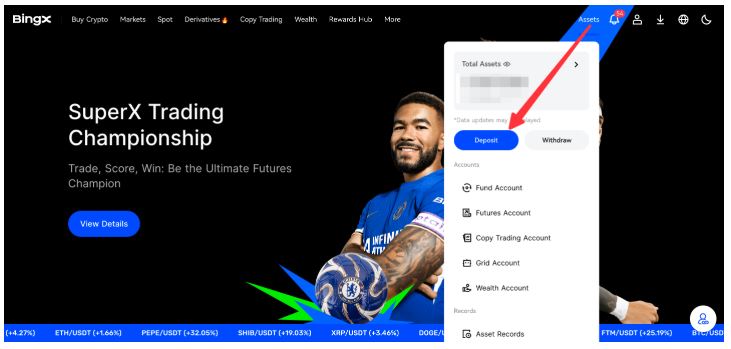
- Click on “Assets” in the top right corner and select “Deposit”.
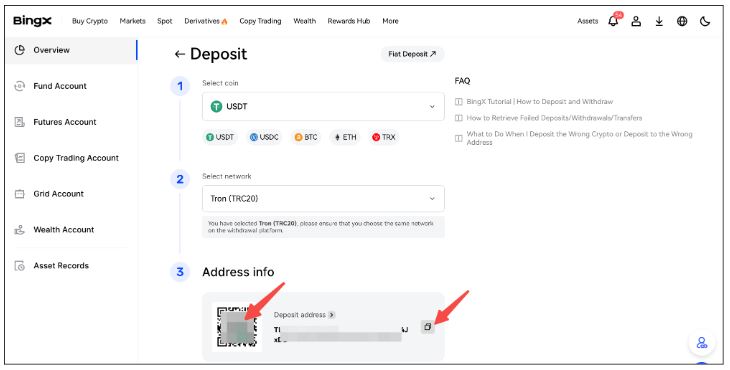
- Choose the coin type, network, and account to receive the deposit.

- Use the withdrawal platform’s scanning feature to scan the QR code or copy the deposit address to complete the transfer.

1.2 Via Mobile App
- How to Deposit & Withdraw on BingX
- Open the BingX app and log in.

- Tap “Assets” at the bottom right and select “Deposit”.

- Choose the currency, coin, and network.
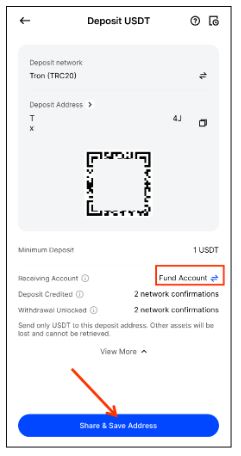
- Select the Receiving Account, then tap “Share & Save Address” to complete the transfer.
Note:
- How to Deposit & Withdraw on BingX
- Ensure you select the correct currency and network to avoid asset loss.
- Deposits below the minimum threshold will not be credited.
- Processing time depends on network congestion.
2. How to Withdraw Crypto
2.1 Via Website
- How to Deposit & Withdraw on BingX
- Log in to your BingX account.

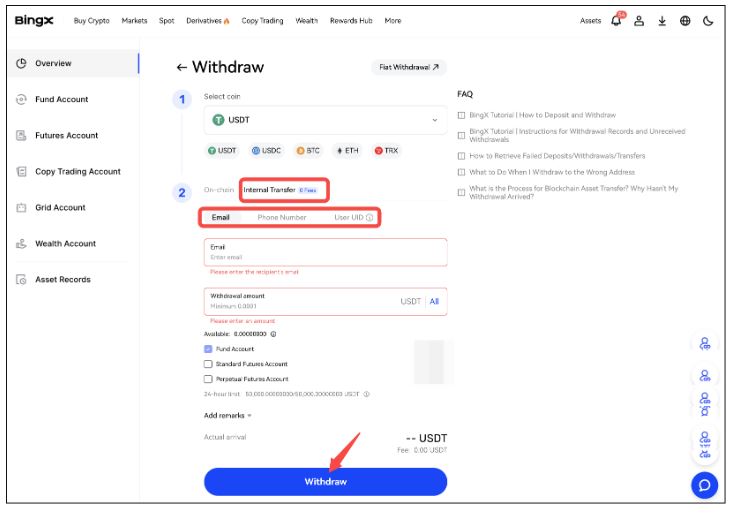
- Click on “Assets” and select “Withdraw”.
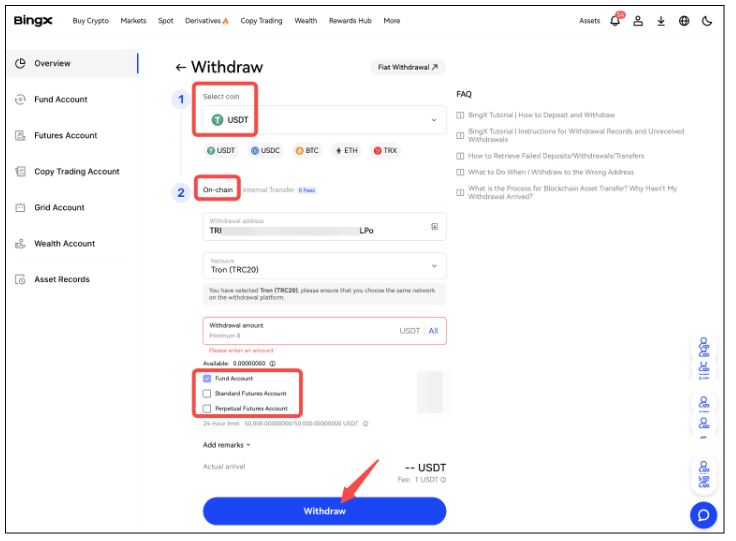
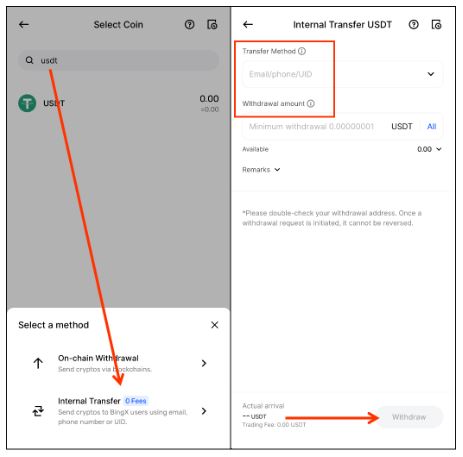
- Choose the coin type and withdrawal method:
- On-Chain Withdrawal: Enter the withdrawal address, select the network, and enter the amount.
- Internal Transfer (0-Fee): Enter the recipient’s email/phone/UID, select an account, and confirm the amount.
- Click “Withdraw” to finalize the transaction.
2.2 Via Mobile App
- How to Deposit & Withdraw on BingX
- Open the BingX app and log in.
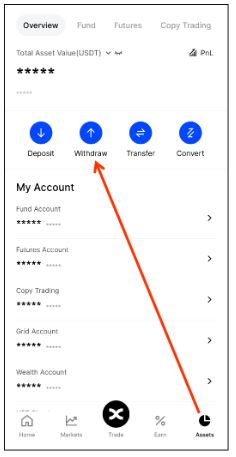
- Tap “Assets” > “Withdraw” > “Crypto”.
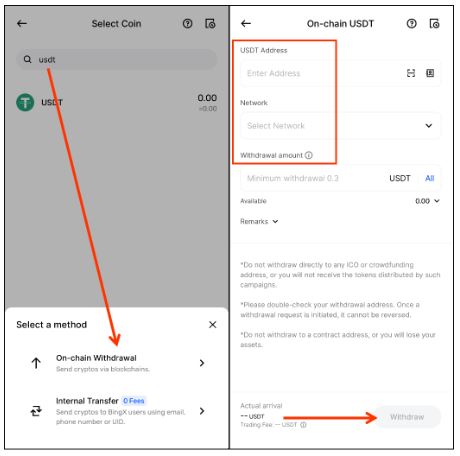
- Choose the coin type and withdrawal method:
- On-Chain Withdrawal: Enter the withdrawal address, select the network, and enter the amount.
- Internal Transfer (0-Fee): Enter the recipient’s email/phone/UID, select an account, and confirm the amount.
- Click “Withdraw” to complete the process.
Note:
- How to Deposit & Withdraw on BingX
- Ensure the withdrawal details are accurate to prevent asset loss.
- Keep your credentials and security codes confidential.
- Blockchain confirmation times vary (10 to 120 minutes).
- Withdrawal values are calculated in equivalent USDT.
- Additional security checks may be required for high-risk transactions.
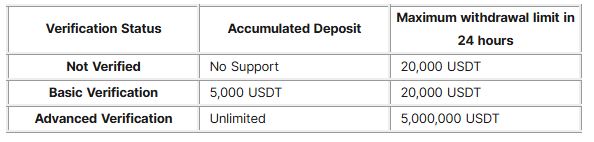
3. About Withdrawal Limits – How to Deposit & Withdraw on BingX
BingX users have different withdrawal limits depending on their identity verification level. To increase your withdrawal limit, complete KYC verification through your account settings.
For further assistance, contact BingX 24/7 online support or visit BingX Support.
We hope this guide helps you deposit and withdraw funds on BingX smoothly!
